
Choosing a Fanless Pc in 2026 means balancing cooling, computing power, and the conditions where the machine will operate. A silent enclosure can suit a dusty workshop, a retail counter, or a compact control cabinet. But fanless does not mean maintenance-free or immune to heat. Check the operating-temperature range, processor power limits, and ventilation clearance before comparing specifications.
The market context is growing. MarketsandMarkets’ Industrial PC Market report estimated a value of USD 5.3 billion in 2023 and projected USD 7.6 billion by 2028. That figure covers industrial PCs broadly; it is not a forecast for fanless systems alone. Still, it points to expanding demand for computing in industrial settings. Buyer needs remain specific. A computer beside a hot machine has different requirements from one mounted behind a digital sign.
One useful engineering rule is: “Judge a fanless PC by its sustained performance at its real operating temperature—not by its peak speed on a cool test bench.” This is an editorial selection principle, not a quotation attributed to a named industry expert. For a dependable choice, compare thermal test conditions, port selection, mounting options, warranty, and long-term component availability. Look closely at the small details. A sealed case may reduce dust entry, yet restricted airflow around it can still trap heat. And a low-noise design may not be the right fit for every workload. The sections ahead explain how to assess these trade-offs and choose a system that fits your actual environment.
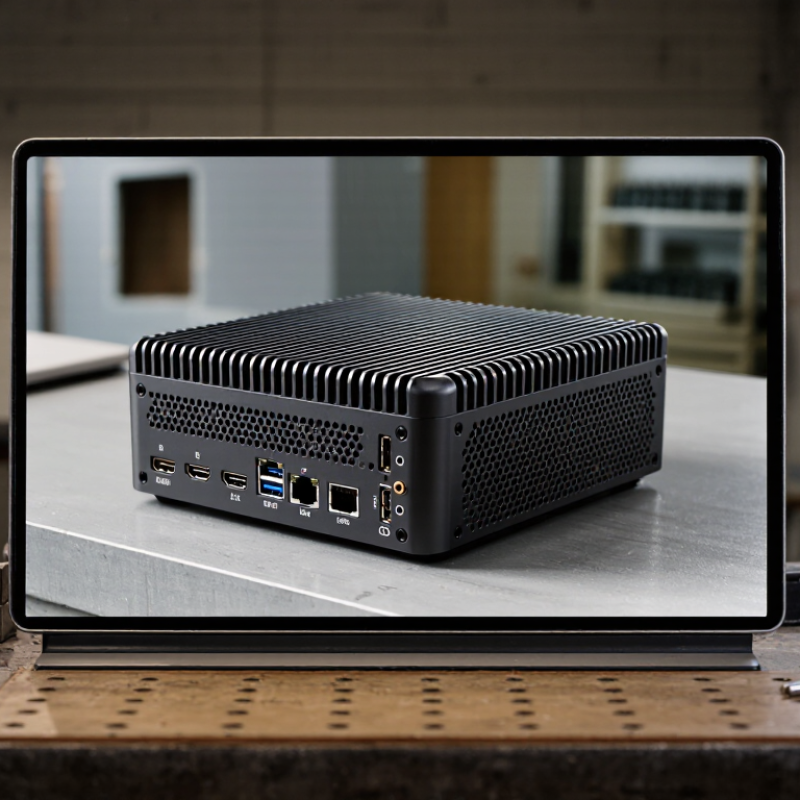
Define the workload before comparing processor specifications. Record the applications, peak data rates, connected devices, and required display outputs. A machine handling sensor logs has different needs from one processing video continuously. Set measurable targets for response time, memory use, storage capacity, and acceptable downtime. Keep a little headroom. Peak demand can surprise you.
Fanless systems depend on their chassis to shed heat, so test sustained performance, not just short benchmark bursts. Note the actual cabinet temperature, airflow around the unit, and nearby heat sources. ASHRAE’s thermal guidelines give 18–27°C as the recommended inlet range for common data-center equipment classes. That is a useful reference, not a guarantee for a sealed enclosure. Check the computer’s own operating limits and test it under your real workload.
For 24/7 use, ask for evidence of continuous-operation testing, thermal-throttling behavior, storage endurance, and recovery after power loss. Uptime Institute’s 2024 Global Data Center Survey reported that 55% of respondents had experienced an outage within the previous three years. The survey covers data centers, not fanless PCs, but it underlines the cost of weak resilience. I would also log temperature and error rates during a trial run. It is easy to overlook the cabinet. Keep spare capacity, document maintenance steps, and define what happens when a device stops responding.

When choosing a fanless PC, match the processor’s heat output to the enclosure, not just the product label. The N100 processor is listed with a 6 W thermal design power rating in its manufacturer specifications. That is a modest starting point for passive cooling. It does not mean the entire computer uses only 6 W, or that every small case can cool it safely.
Look for a metal chassis with enough surface area to spread heat, and check whether the maker documents sustained-load testing. A tiny box can feel cool during a brief setup, then become warm after an hour of video playback or repeated file transfers. Ambient temperature matters too: a device tucked behind a monitor has less room to shed heat than one sitting on an open desk.
Not the whole story.
TDP is a useful comparison figure, but workloads, memory, storage, and power limits also affect temperatures. I would check long-duration performance data before buying; those figures are sometimes missing, which makes comparison harder. A lower-rated processor can still throttle in a poorly designed enclosure, while careful case design can make a modest processor more dependable without a fan.
An IP65 rating is a practical starting point when choosing a fanless PC for dusty workshops or areas exposed to washdown. Under IEC 60529, the first digit, 6, indicates a dust-tight enclosure. The second digit, 5, indicates protection against water jets from a nozzle under defined test conditions.
That is useful, but it does not mean the computer can be submerged. Nor does it automatically make every cleaning method safe.
Check the rating of the complete, assembled unit, including connector covers and cable entries. A loose gasket or unused port can undermine the enclosure’s protection. Small details matter.
Also consider heat: a sealed, fanless case must move processor heat through its chassis, so high ambient temperatures, direct sun, or sustained workloads may affect performance. Review the rated operating temperature and thermal limits for your actual installation.
IP65 can sound reassuring, perhaps too reassuring; test conditions do not reproduce every site. Dust, cleaning routines, mounting position, and maintenance all deserve a second look.
Start with the application, not the advertised maximum. A vision system handling several camera streams may need more memory than a simple control terminal. An office gateway may need little memory but benefit from reliable storage for frequent logging. Check whether memory is replaceable or soldered, and confirm the supported capacity in the technical documentation. Small detail. It matters later.
Match storage to the workload. An operating system and basic control software may fit on a modest drive, while local video or database files need more capacity. Check the drive type, available sockets, and whether the system supports a second device. In a compact fanless enclosure, sustained writes can also raise temperatures. Leave room for operating-system updates and log growth; estimates are often too optimistic.
Map every required connection before choosing a configuration. Count network ports, USB devices, displays, and any serial connections used by existing equipment. Then check whether expansion slots remain available for future cards, and verify their size, power, and clearance. A port that looks suitable may not support the needed speed or display mode, so compare device specifications carefully. Expansion can be awkward. Fanless designs trade moving parts for tight thermal limits, and a planned card may need testing under real workloads.
A fanless PC can run quietly and still fail in a hot cabinet. Check its stated operating-temperature range, then compare that figure with the air temperature where the computer will actually sit. A sunny enclosure, nearby power supply, or restricted airflow can raise local temperatures. Numbers need context.
Ask for the test conditions behind the rating. IEC 60068-2-1 covers cold tests, while IEC 60068-2-2 covers dry heat. These methods help assess performance under defined conditions; they do not create one universal temperature rating. Confirm whether the unit was powered during testing, how long it was exposed, and how it was mounted. A result from an open bench may not represent a tightly packed enclosure.
For shock resistance, look for IEC 60068-2-27 test details, not just the phrase “shock tested.” The report should identify pulse shape, acceleration, duration, direction, and number of impacts. Details matter. Check whether storage drives, connectors, and mounting hardware were included in the tested configuration. A bare-board test may miss weaknesses in the finished system. If the documentation leaves out these details, treat the claim cautiously and ask for the full test report. Even then, lab results cannot reproduce every bump during transport or installation. That limitation deserves a little thought.
| Example Selection Profile | Typical Operating-Temperature Target | Temperature Test Methods to Check | Example Shock Requirement | Shock Test Method to Check | What to Verify Before Selection |
|---|---|---|---|---|---|
| Indoor control cabinet | 0°C to +50°C | IEC 60068-2-1 (cold) and IEC 60068-2-2 (dry heat), where applicable to the stated limits | 15 g, 11 ms half-sine pulse; specify axes and pulse count | IEC 60068-2-27 | Confirm the temperature range applies to powered operation and the intended mounting orientation, enclosure, and workload. |
| Unheated industrial enclosure | -20°C to +60°C | IEC 60068-2-1 for low-temperature exposure and IEC 60068-2-2 for high-temperature exposure | 15 g, 11 ms half-sine pulse; specify test directions and number of shocks | IEC 60068-2-27 | Check boot-up and sustained operation at both temperature limits; confirm whether storage limits differ from operating limits. |
| Mobile equipment or vehicle installation | -20°C to +60°C, subject to the installation environment | IEC 60068-2-1 and IEC 60068-2-2; test severity and duration should match the application | 30 g, 11 ms half-sine pulse as an example severity; specify axes, directions, and pulse count | IEC 60068-2-27 | Request the test report and verify the mounted configuration, connectors, storage device, and functional checks before and after shock. |
| Cold or hot industrial site | -40°C to +70°C | IEC 60068-2-1 and IEC 60068-2-2; confirm the test duration, recovery conditions, and powered state | 20 g, 11 ms half-sine pulse as an example requirement; set severity for the actual transport or operating environment | IEC 60068-2-27 | Look for thermal derating information, component limits, and evidence that the complete system—not only individual parts—was evaluated. |
The profiles and values above are illustrative selection targets, not measured specifications for particular computers. IEC 60068-2-1 and IEC 60068-2-2 describe environmental test methods; they do not by themselves define a universal operating-temperature rating. IEC 60068-2-27 describes shock testing, and the test severity, pulse shape, directions, and acceptance criteria must be specified for the application. Ask for test conditions and results, and distinguish operating limits from storage limits.


All of Hapco's formulations are completely free of Mercury.

Hapco has been in business for over 50 years!

*NOTICE* Hapco will be will be closed on Monday, May 26th, in observance of Memorial Day. |
| Cookie | Duration | Description |
|---|---|---|
| cookielawinfo-checkbox-analytics | 11 months | This cookie is set by GDPR Cookie Consent plugin. The cookie is used to store the user consent for the cookies in the category "Analytics". |
| cookielawinfo-checkbox-functional | 11 months | The cookie is set by GDPR cookie consent to record the user consent for the cookies in the category "Functional". |
| cookielawinfo-checkbox-necessary | 11 months | This cookie is set by GDPR Cookie Consent plugin. The cookies is used to store the user consent for the cookies in the category "Necessary". |
| cookielawinfo-checkbox-others | 11 months | This cookie is set by GDPR Cookie Consent plugin. The cookie is used to store the user consent for the cookies in the category "Other. |
| cookielawinfo-checkbox-performance | 11 months | This cookie is set by GDPR Cookie Consent plugin. The cookie is used to store the user consent for the cookies in the category "Performance". |
| viewed_cookie_policy | 11 months | The cookie is set by the GDPR Cookie Consent plugin and is used to store whether or not user has consented to the use of cookies. It does not store any personal data. |