
Industrial Printing Systems are no longer judged by speed alone. Buyers compare uptime, substrate range, color consistency, automation, service access, and total cost per finished unit. A line printing thousands of labels each hour has different needs from a system marking metal parts or decorating packaging. The details matter.
Smithers’ report The Future of Global Printing to 2027 estimated the global print market at $818.5 billion in 2022 and projected growth to $846 billion by 2027. This figure covers print broadly, not industrial systems alone. Still, it signals a large, evolving market where production technology and application requirements continue to shape investment decisions. Industry analyst Marco Boer of IT Strategies has emphasized the value of assessing digital printing in relation to each application’s production economics. This introduction paraphrases that perspective rather than presenting it as a direct quotation.
A useful comparison starts with the work a system must perform. Can it handle the intended material? How quickly can operators change jobs? Are spare parts and trained technicians available near the facility? Buyers should also inspect sample output, ask about maintenance intervals, and verify performance under realistic production conditions. A polished specification sheet is not enough.
There are trade-offs. Higher automation may reduce routine labor, yet add integration complexity. A fast press may still be a poor fit for short runs or frequent design changes. The following overview examines ten Industrial Printing Systems through practical buyer criteria, helping global teams compare capabilities without treating any single specification as a universal answer.
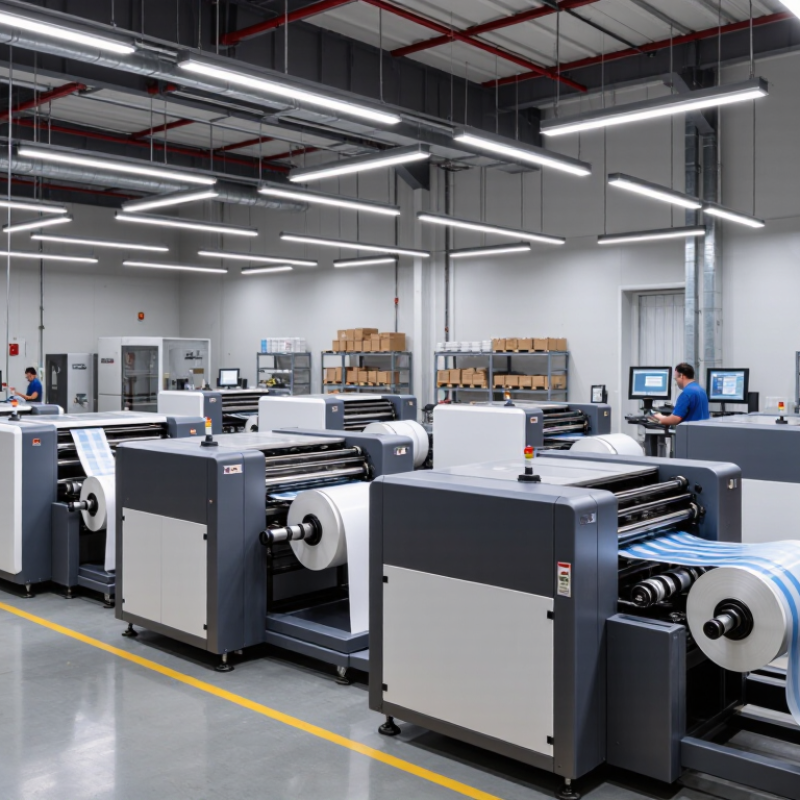
Industrial Printing Systems: Core Functions and Operating Principles
Industrial printing systems turn digital files into repeatable marks on paper, film, metal, cartons, or engineered parts. Their core job is controlled image transfer: feed and align a substrate, apply ink or toner, then dry, cure, or fuse the image. Inkjet ejects droplets through nozzles. Electrophotography uses charged surfaces and heat. Flexographic and screen systems transfer ink through plates or mesh. Sensors track web tension, registration, temperature, and color. On a fast production line, a fraction of a millimeter matters.
The control loop links these steps. A camera can detect registration drift, while software adjusts print timing or ink delivery. Operators still need to check nozzle condition, substrate moisture, and curing temperature; automation cannot fix every setup error. The International Energy Agency’s Energy Efficiency 2023 report says industry accounted for about 37% of global energy demand in 2022. That broad figure is not printing-specific, but it makes dryer settings and idle time worth measuring. Smithers’ The Future of Global Printing to 2028 analyzes print processes and end-use markets, a useful reminder that one speed or resolution figure rarely describes an entire system. Not just speed. A weak point remains: chasing throughput can increase waste when setup checks are rushed.

Typical material-transfer interfaces in common production configurations
The chart counts the points where ink, toner, or transfer material passes between surfaces before reaching the substrate. Direct inkjet ejects droplets onto the substrate without an intermediate transfer interface; flexographic and offset processes typically use two. Counts describe common configurations, not printing speed, quality, or overall system complexity.
Industrial printing depends on the surface, production speed, and information each item must carry. Inkjet systems apply small droplets directly to products or packaging. They suit variable codes, dates, and graphics, with little changeover between designs. Yet porous cardboard and curved containers may need different inks or careful printhead positioning.
Screen printing pushes ink through a mesh stencil, creating bold, durable layers on signs, panels, and formed parts. It works well for repeated designs, though setup can take time when artwork changes. Flexography uses rotating plates and is common for high-volume labels and flexible packaging. Its speed is useful, but color and registration need regular checks. A neat sample can mislead.
Laser marking alters a surface rather than laying down ink. It can produce lasting identification on compatible metals and plastics, but results depend on material and settings. Thermal-transfer printing uses a heated ribbon to place text or codes on labels and flexible films. No method fits every line. Buyers should test actual materials, cleaning conditions, and line speeds before choosing equipment. Even then, maintenance access and operator training are easy to underestimate.
Industrial printing systems serve different production needs; the right choice depends on the material, line speed, and image requirements. Direct-to-product inkjet prints variable text, codes, or graphics on cartons, bottles, and metal parts. Thermal-transfer systems suit packaging films and labels where clear, durable barcodes matter. Laser marking changes a surface rather than adding ink, making it useful for traceability on tools and components. Small details matter. Curved parts, dust, and line vibration can weaken print quality. A production-line trial is more informative than a polished sample sheet.
Flexographic presses handle long runs of flexible packaging, labels, and corrugated board. Offset presses deliver fine detail on paperboard cartons, while gravure is often chosen for very high-volume packaging. Cylinder preparation, however, adds cost and time. Screen printing creates opaque, tactile layers on signs, panels, and glass; wide-format inkjet produces displays and large graphics. Digital textile systems print patterns on fabric with less setup between designs, but pretreatment and curing still affect color and wash performance. None is effortless. Even capable equipment can disappoint when ink compatibility, drying time, or nozzle maintenance is overlooked. Compare samples printed on the actual material, and check service access and spare-part availability.
| Top 10 Industrial Printing Systems for Global Buyers - Ten Industrial Printing Systems and Their Typical Applications | ||||
|---|---|---|---|---|
| Printing System | How It Works | Common Substrates | Typical Applications | Typical Production Fit |
| Flexographic Printing | Flexible relief plates transfer ink to the substrate, commonly through a series of rollers. | Paper, paperboard, films, foil, and label stock | Flexible packaging, labels, cartons, paper bags, and corrugated packaging | Well suited to long runs and continuous web production; commonly used for repeat designs. |
| Rotogravure Printing | Engraved cells in a rotating cylinder hold and transfer ink to the material. | Plastic films, paper, foil, and laminates | High-volume flexible packaging, decorative films, and publication printing | Best suited to very long runs where consistent image quality can justify cylinder preparation. |
| Offset Lithographic Printing | Ink transfers from a plate to a rubber blanket, then onto the substrate. | Paper, paperboard, and certain metal sheets | Commercial print, books, magazines, folding cartons, and printed metal packaging | Efficient for medium to long runs with detailed graphics and consistent color reproduction. |
| Industrial Inkjet Printing | Printheads deposit digitally controlled droplets of ink without a printing plate. | Paper, board, film, textiles, ceramics, and treated surfaces | Packaging codes, variable-data graphics, product decoration, and short-run print | Flexible for changing artwork, personalization, and shorter runs; compatible with many production-line formats. |
| Screen Printing | Ink is forced through open areas of a mesh screen onto the substrate. | Textiles, glass, ceramics, plastics, metal, and printed circuit materials | Garments, signage, control panels, glass decoration, and functional printed layers | Useful for opaque ink deposits, specialty inks, and printing on flat or shaped objects. |
| Pad Printing | A flexible silicone pad picks up an image from a plate and transfers it to an object. | Plastic, metal, glass, and coated components | Small logos, symbols, scales, and markings on curved or irregular parts | Designed for small-area printing on three-dimensional components and uneven surfaces. |
| Thermal Transfer Printing | A heated printhead transfers ink from a ribbon onto a label or other suitable material. | Label stock, tags, flexible packaging films, and synthetic materials | Product identification, barcodes, logistics labels, and durable asset labels | Common in on-demand identification and coding; print durability depends on ribbon and substrate selection. |
| Direct Thermal Printing | A heated printhead darkens a heat-sensitive coating; no ink ribbon is required. | Direct-thermal paper and compatible label stock | Shipping labels, receipts, tickets, and short-life logistics labels | Simple, ribbon-free operation for applications where the print’s exposure and service-life requirements are suitable. |
| Digital Textile Printing | Inkjet printheads apply textile inks directly to fabric or to transfer paper for later application. | Natural and synthetic fabrics, depending on ink and process | Apparel, home textiles, flags, soft signage, and custom fabric patterns | Well suited to short runs, design changes, and made-to-order production; pretreatment and fixation may be required. |
| Large-Format UV Flatbed Printing | Inkjet printheads deposit UV-curable ink, which is cured by ultraviolet light during printing. | Rigid and flexible materials such as boards, plastics, glass, and coated metal | Signage, display panels, point-of-sale graphics, and direct-to-object decoration | Useful for short-to-medium runs and varied substrates; adhesion and surface preparation depend on the material. |
Comparing ten industrial printing systems requires more than reading headline speeds. A line rated at 100 metres per minute may slow sharply when printing fine text, variable codes, or dense coverage. Ask suppliers to run your actual artwork on your actual substrate. Measure saleable output, not just machine speed. That distinction matters.
Material flexibility changes the calculation. Direct-to-object systems can handle shaped parts, while flatbed systems suit rigid panels and sheets. Check adhesion, curing, scratch resistance, and colour consistency after production—not only on a fresh sample. Smithers’ The Future of Digital Printing to 2032 estimates that digital print value will rise from $167.5 billion in 2022 to $251.1 billion by 2032. That growth signals broader adoption, but it does not prove every digital system fits every factory.
Compare total operating cost per usable unit. Include ink, screens or plates, energy, maintenance, operator time, setup waste, and downtime. A slower system may cost less on short runs; a faster one may win on stable, high-volume work. Request a timed trial with changeovers and cleaning included. Results can still disappoint. Humidity, substrate variation, and operator experience affect output, and early estimates often miss those details. Build a pilot into the purchase decision, then review the figures before committing.
Global buyers should compare industrial printing systems against the actual job, not just advertised speed. List the substrates, print widths, daily volumes, and image requirements your operators handle. A sample run can reveal issues that a specification sheet misses, such as ink drying unevenly on a textured surface. Ask suppliers for repeatable test results and clear maintenance intervals. Small details matter.
Integration deserves equal attention. Confirm the system’s footprint, electrical requirements, ventilation needs, and connection options before arranging delivery. Check whether its software can exchange job data with your existing production tools. Ask who handles installation, operator training, and remote troubleshooting, and get response times in writing. A technically capable machine can still disrupt a line if setup takes longer than expected. We sometimes underestimate the time needed to adjust workflows; that deserves a careful review.
Tips: Send suppliers samples of your real materials, not just ideal stock. Request a short acceptance test using your artwork and target production speed. Keep spare parts, consumables, and service access in the sourcing discussion. Compare the total cost of ownership, including downtime and training, rather than purchase price alone.


All of Hapco's formulations are completely free of Mercury.

Hapco has been in business for over 50 years!

*NOTICE* Hapco will be will be closed on Monday, May 26th, in observance of Memorial Day. |
| Cookie | Duration | Description |
|---|---|---|
| cookielawinfo-checkbox-analytics | 11 months | This cookie is set by GDPR Cookie Consent plugin. The cookie is used to store the user consent for the cookies in the category "Analytics". |
| cookielawinfo-checkbox-functional | 11 months | The cookie is set by GDPR cookie consent to record the user consent for the cookies in the category "Functional". |
| cookielawinfo-checkbox-necessary | 11 months | This cookie is set by GDPR Cookie Consent plugin. The cookies is used to store the user consent for the cookies in the category "Necessary". |
| cookielawinfo-checkbox-others | 11 months | This cookie is set by GDPR Cookie Consent plugin. The cookie is used to store the user consent for the cookies in the category "Other. |
| cookielawinfo-checkbox-performance | 11 months | This cookie is set by GDPR Cookie Consent plugin. The cookie is used to store the user consent for the cookies in the category "Performance". |
| viewed_cookie_policy | 11 months | The cookie is set by the GDPR Cookie Consent plugin and is used to store whether or not user has consented to the use of cookies. It does not store any personal data. |